The FujiFilm .MPO 3D photo format

A few weeks ago my dad, in his love for electronic gadgetry, purchased a FujiFilm FinePix REAL 3D camera. The concept is pretty simple: it’s basically two cameras in one, with the two sensors spaced as far apart as an average pair of human eyes. The coolest thing about the camera is its LCD display, which achieves autostereoscopy by using a lenticular lens (kind of like those novelty postcards that change from one picture to another when you look at them from different angles), so if it’s held at the right angle and distance from the eyes, the picture on the LCD display actually appears 3-dimensional without special glasses!

Anyway, I immediately started wondering about the file format that the camera uses to record its images (as well as movies, which it also records in 3D). In the case of videos, the camera actually uses the well-known AVI container format, with two synchronized streams of video (one for each eye). In the case of still photos, however, the camera saves files with a .MPO extension, which stands for Multiple Picture Object.

I was expecting a complex new image specification to reverse-engineer, but it turned out to be much simpler than that. A .MPO file is basically two JPG files, one after another, separated only by a few padding zeros (presumably to align the next image on a boundary of 256 bytes?). Technically, if you “open” one of these files in an image editing application, you would actually see the “first” image, because the MPO file looks identical to a regular JPG file at the beginning.

I proceeded to whip up a quick application in C# to view these files (that is, view both of the images in each file). This quick program also has the following features:

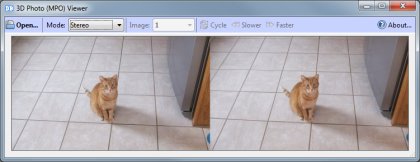
  • It has a “stereo” mode where it displays both images side by side. Using this feature you can achieve a 3D effect by looking at both images as either a cross-eyed stereogram (cross your eyes until the two images converge, and combine into one) or a relaxed-eye stereogram. You might have to strain your eyes a bit to focus on the combined image, but the effect truly appears 3-dimensional.
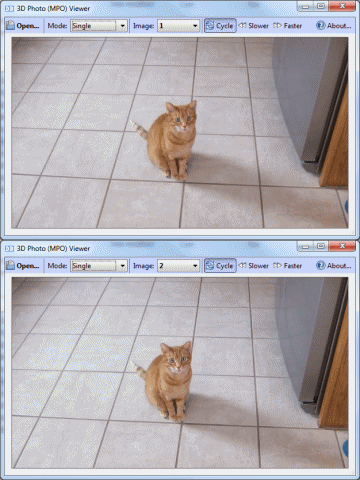
  • In “single” mode, the program allows you to automatically “cycle” between the two images (a wiggle-gram, if you will), which creates a cheap jittery pseudo-3D effect (see screen shots below).
  • Also in “single” mode, the program lets you save each of the frames as an individual JPEG file by right-clicking on the picture.
So, if you want a quick and not-so-dirty way of viewing your MPO files, download the program and let me know what you think! (Or browse the source code on GitHub)
Here’s a screenshot of the program in “stereo” mode:

And a screenshot of the program in “cycle” mode:

If you like, you can download the original .MPO file shown in the screenshots above.

Now for a bit of a more technical discussion…. Clearly it would be a great benefit to add support for the .MPO format to DiskDigger, the best file carving application in town.

However, from the perspective of a file carver, how would one differentiate between a .MPO file and a standard .JPG file, since they both have the same header? As it is now, DiskDigger will be able to recover the first frame of the .MPO file, since it believes that it found a .JPG file.

After the standard JPG header, the MPO file continues with a collection of TIFF/EXIF tags that contain meta-information about the image, but none of these tags seem to give a clue that this is one of two images in a stereoscopic picture (at least not the tags within the first sector’s worth of data in the file, which is what we’re really interested in).

One of the EXIF tags gives the model name of the camera, which identifies it as “FinePix REAL 3D W3.” Perhaps we can use the model name (the fact that it contains “3D”) to assume that this must be a .MPO file, but I’d rather not rely on the model name, for obvious reasons, although the FinePix is currently the only model that actually uses this format (to my knowledge).

The other option would be to change the algorithm for JPG carving, so that every time we find a JPG file, we would seek to the end of the JPG image, and check if there’s another JPG image immediately following this one. But then, what if the second JPG image is actually a separate JPG file, and not part of a MPO collection?

For the time being, DiskDigger will in fact use the model name of the camera to decide if it’s a .MPO file or just a regular .JPG file. The caveats of doing this would be:

  • It won’t identify .MPO files created by different manufacturers.
  • It might give false positive results for .JPG images shot with the camera in 2D mode.

As always, you can download DiskDigger for all your data recovery needs. And if anyone has any better ideas of how to identify .MPO files solely based on TIFF/EXIF tags, I’d love to hear them!

Update: DiskDigger now fully supports recovering .MPO files, based on deep processing of MP tags encoded in the file!

Share this article:
  • Facebook
  • LinkedIn
  • Reddit
  • Twitter

22 thoughts on “The FujiFilm .MPO 3D photo format

  1. CHC

    The picture of the cat in “cycle” mode… if say, the cycle were on the order of 20Hz, would it appear 3D without glasses? Otherwise I don’t understand how one could perceive a flat image as 3D without glasses.

    Reply
  2. db

    In the case of “cycle” mode, if you take it beyond 20Hz, it would just look like two images overlaid on one another, and it wouldn’t appear 3D.

    But in the case of “stereo” mode, you can truly see it as 3D by crossing your eyes and focusing on the “combined” image. Have you ever looked at those “magic eye” pictures with a 3D image hidden in random dots? It’s the same principle, except you have to cross your eyes instead of looking through the picture (set your eyes’ focal point “in front of” the picture).

    I’ve updated the post with a downloadable version of the actual MPO file used in the screenshots, so you can play around with it if you like.

    (Love the new blog, btw)

    Reply
  3. CHC

    Thanks Dmitry, for your words… re the 3D magic images, I have been only marginally successful at crossing my eyes the right way to see them. A “killer” technology would be 3D without glasses or eye-crossing, but short of holography, not sure how that would work.

    Reply
  4. Woody

    If you want to establish it is an MPO rather than a jpeg and you are looking through the file for it, just look for the MPII information after the Exif block (and the parallax info in the exif block).

    Reply
  5. j-p guillon

    works good with the pictures, how can we transfer the 3D videos to be played and viewed on other 3D screen.
    i use a trimon and zalman stereoscopic player

    Reply
  6. Jeremy

    Great work! Would you be willing to share the source? The new Nintendo 3DS has similar technology though the size of the photo isn’t optimal for the current version of your application. It would also be nice to export the image into a separate file.

    Reply
  7. chen

    Very good’s project
    would you share this source code for me?
    because I don’t no how to transform 2 jpg format
    my email:a26732300@yahoo.com
    thank you!

    Reply
  8. rodolpho knorr

    Please:

    Can someone inform me of a program to combine two jpg files and produce a .mpo ??????

    I have hundreds of pairs which I use to make Anaglyph 3D and I would like to see them on my new 3D TV

    Take you all in advance

    Rodolpho Knorr

    Rio, Brasil

    Reply
  9. Frank Warzeski

    Dmitri,

    Out of curiosity, I downloaded the MPO image you included (DSCF0005.MPO)to see what would happen if I tried to open it in IrfanView (Ver. 4.30). Much to my surprise, IrfanView recognized that the file contains two images and when I opened it, I could easily cycle between the left (#1) and right (#2) images. I was able to copy and paste each into Photoshop. From there, it’s quite easy to produce a side-by-side stereo pair or a cyan-red anaglyph. Cool!

    Now, I’m seriously thinking about purchasing one of the FujiFilm 3D cameras.

    All the best . . . .

    Frank

    Reply
  10. Roger

    Since both jpg files are produced simultaneously wouldn’t
    they both have identical date and time stamps in their
    exif info?

    Reply
  11. db

    Roger,
    That’s a good idea; it would certainly narrow it down. I think the Exif timestamp resolution is 1 second, so there’s a slight possibility that multiple (independent) exposures were done within 1 second, but it’s better than nothing.

    Reply
  12. Dmitri

    http://stereo.jpn.org/eng/stphmkr/ – all mpo functions!

    Project stereo image onto a sphere.
    Single or multiple floating windows to reduce anaglyph ghosting problems
    Create images for display on 3D-ready DLP TV’s.
    Clone brush to adjust stereo depth of incorrectly positioned features.
    Automatically align and correct stereo-pairs and mount them to the window.
    Automatic cropping of blank space after certain Easy Adjustment operations.
    Image may be corrected for vertical disparity error with a resolution of one pixel and positioned in stereo-space.
    Reduced ghosting for anaglyphs using realtime Lab and RGB color-space controls.
    Manual color-adjustment in realtime using HSL color-space. Work on entire color-range or just a particular hue.
    Fuzzy Borders may be added to reduce retinal-rivalry caused by stereo-window violations.
    Automatically adjust the brightness/color of one image to a correctly-exposed reference image.
    Define a pair of homologous points that SPM will automatically position at the stereo-window, correcting any vertical error.
    Add Overlay Image to your background for decorative framing or simple stereo-compositing.
    Create a Popup Anaglyph still-image or object-movie for print or flat-screen viewing.
    Custom Optimization of Anaglyph R,G,B mixing and contrast.
    Save and Restore Custom optimized anaglyph parameters.
    Save a JPG anaglyph with no compression ghosting.
    One or both images may be mirrored horizontally or flipped vertically to accomodate any custom/commercial taking and viewing equipment.
    Image frame may be rotated 90 degrees left or 90 degrees right or image-pair may be rotated within frame by any angle.
    Hue, saturation, lightness and gamma of the individual images may be altered.
    The images may be sharpened
    Crop the image to any size or to one of five custom-sizes
    Crop the image to a user-defined aspect-ratio
    Accurately crop large, zoomed-in images (such as panoramas)
    Resize using pixel-resize or bilinear interpolation, retaining aspect-ratio if desired
    Resize image in fine increments of 0.1% (useful when using cameras in tandem or correcting lens mismatch).
    When resizing, retain aspect-ratio with or without a border
    Automatic correction of image-rotation errors
    Manual correction of image ‘keystone’ errors.
    Manual correction of barrel-distortion, especially in wide-angle lenses
    Overlay a user-defined grid on images in Easy Adjustment mode
    Edge-detection filter to simplify image-correction or for creating a pictorial effect
    Alignment information may be saved in SPM’s own uncompressed DAS file-format
    Mosaic image-strips (produced by a stereo, virtual camera in 3D Rendering programs) into panoramic images

    Reply
  13. Peter Adderley

    Gday Dmitry,
    I’ve just bought a Fuji 3D camera this afternoon and was stunned to find they didn’t have any software for viewing stereo images. Having been taking 3D images since the mid-1960′s I’ve never come across any good method of viewing them properly.
    The cute software app that you provide, with thanks, is very good but may I suggest a couple of necessary tweaks.

    1. You need to revert back to or provide normal X/Y proportions, since the user has to do this simply by eye.

    2. The side by side method you use is called “cross-eye” viewing, but you need to swap these back to “relaxed” or “parallel” viewing. 3D viewers, in my experience are split down the middle – some can achieve one method but not the other. I can do both but I find “cross-eye” very straining on the eyes.

    If you could do this then I’m sure you could sell it to Fujifilm. That is IF 3D viewing becomes popular, and I’m sure it will when 3D TV becomes common.

    Please keep me posted if you can achieve the alternate “relaxed” viewing as I have some great use for it, as I am designing workshop courses for building solid geometric models and will be using 3D viewing a great deal.

    BTW Atari Computers brought out a wonderful 3D viewing system back in the 1980′s which employed LCD shutter glasses. They even brought out a 3D CAD system. I still consider LCD shutter glasses to be the best way to view 3D, and red/blue anaglyphs are not the way to go.

    Many thanks and
    Cheers,
    Peter Adderley

    Reply
  14. Peter Adderley

    Dmitry,
    Wow, now THAT’s service, in adding the “relaxed” viewing to your app. Thank you so much!
    But now I’m going to be greedy with yet more requests. I do so from experiencing all kinds of problems in stereo viewing and have even gone to the point of making my own viewer, using mirrors.
    So here goes:
    1. Need to view images with no X:Y distortion, as the distortion provides no useful function at all.
    2. Zoom function would be great, and in a way that the two windows zoom to the same area in each image.
    3. Ability to adjust parallax as everyone has different comfort zones. (you can see the Fujifilm camera has this)

    If you can achieve this, then you will have a “one of a kind application”.

    Congrats on your work!!

    Cheers,
    Peter

    Reply
  15. imgMe

    I’m trying to create an MPO from 2 jpgs, I tried reducing both images to byte arrays and combining them with padding up to the nearest 256 between but this doesn’t create a valid MPO file. Am I missing something?

    Reply
  16. trevor

    Impressive forensic coding on this one Dmitry. I’m actually trying to write some software to make an MPO file out of two jpegs, and it sounds pretty attainable after reading your efforts. Do you think that would be achievable easily enough?

    Reply
    1. Dmitry Brant Post author

      Thanks! Creating an .MPO file from two .JPG images may be pretty easy, but it will depend greatly on what software you’ll use to view the resulting .MPO file. Superficially, an .MPO file is simply two .JPG files, one after the other, padded with a few zeros.

      However, the individual .JPG images also have Exif-style tags that describe the structure of the MPO object (i.e. offsets and sizes for the two images). So, if your MPO viewer depends on the Exif tags to decode the MPO structure, then you’ll have to encode all that data when combining the two .JPG files.

      My .MPO viewer in the above article doesn’t care about the Exif tags, but I don’t know if that’s the norm for other .MPO viewers…

      Reply

Leave a Reply

Your email address will not be published. Required fields are marked *

You may use these HTML tags and attributes: <a href="" title=""> <abbr title=""> <acronym title=""> <b> <blockquote cite=""> <cite> <code> <del datetime=""> <em> <i> <q cite=""> <strike> <strong>