DiskDigger can now be found at https://diskdigger.org! This is an old version of the blog post that originally introduced DiskDigger, preserved for posterity.
Lost your files? Dig them up!
This is the old home page of DiskDigger — an all-in-one undelete and recover utility that’s simple, straightforward, and easy to use! See the FAQ for more information, or continue reading below.

Find DiskDigger useful? Consider donating!
What is DiskDigger?
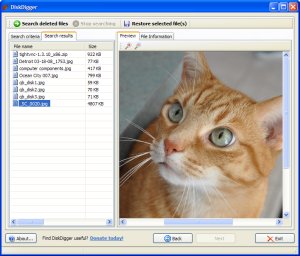 DiskDigger can recover files from any type of media that your computer can read. This includes USB flash drives, memory cards (SD, CompactFlash, Memory Stick, etc), and of course your hard drive. The types of files that it recovers include photos, videos, music, documents, and many other formats.
DiskDigger can even scan reformatted or badly formatted disks (disks to which Windows can’t assign a drive letter), and even disks with bad sectors. It bypasses the Windows file system drivers and scans your disk directly. It has its own built-in support for the following file systems: FAT12 (floppy disks), FAT16 (older memory cards), FAT32 (newer memory cards and hard disks), NTFS (newer hard disks), and exFAT (Microsoft’s new successor to FAT32).
DiskDigger is also very compact and portable. The entire program is a single executable file that you can run from anywhere. There’s nothing to “install,” and the program doesn’t leave any trace of having been run.
You may find DiskDigger useful if…
- you deleted one or more photos from a memory card by accident, and want them restored.
- you deleted one or more photos from a memory card on purpose, but now want them restored.
- you deleted some documents from your USB flash drive, and want to recover them.
- you came across an old hard drive of yours (or someone else’s) that’s been reformatted, and would like to see what its previous contents were.
- you’ve “securely wiped” your media, and want to make sure that your media has actually been wiped correctly.
- you’re just curious about what old deleted files are still present on your memory cards or hard drives.
DiskDigger is also a work in progress. This means that new features will be added very frequently, including support for more file formats, more configuration options, etc., so check back for updates.
How does it work?
DiskDigger has two modes of operation which you can select when scanning your media for deleted files:
- Scan the file system for deleted files (dig deep). This scans the file system that is present on your media, searching for deleted file entries. Supported file systems are FAT12, FAT16, FAT32, exFAT, and NTFS. The advantages of this are:
– Very fast
– Recovers all file types
– Recovers file names
And the disadvantages are:
– Doesn’t support all possible file systems (see above for supported file systems)
– Doesn’t scan entire disk (only scans what the file system is aware of) - Scan the disk surface for traces of lost files (dig deeper). This thoroughly scans every sector of your media, searching for traces of known file types. The advantages of this are:
– Scans entire disk
– Goes underneath the file system, therefore independent of file system
And the disadvantages are:
– Slower (sometimes much slower) than the first method
– Doesn’t recover file names or fragmented files
– Only supports certain file types
– Finds ‘existing’ files as well as deleted files
What isn’t DiskDigger?
It’s not magic. It can’t recover any arbitrary file from any amount of time in the past. When trying to recover lost files, you should be realistic. In a real-world situation, you’ll have a good chance of recovering your files only if they were deleted very recently. The more you keep using your disk to work with new files, the slimmer your chance of recovering deleted files. Of course it’s always worth a try.
It is not a “repair” utility. It cannot repair a broken memory card or disk. DiskDigger is a strictly “read-only” tool, and never changes the contents of the media you scan. It will, of course, scan unformatted (or badly formatted) media, but it won’t attempt to fix the formatting of the media.
Features:
- DiskDigger scans for many different types of files, including photos, videos, music files, and documents, and displays what it finds as it scans in real time.
- You can preview most of the files found by DiskDigger without having to save them to a different location first. More than that, you can preview files while DiskDigger continues scanning!
- DiskDigger scans any type of media that is readable by your computer, including USB flash drives, memory cards (SD, CompactFlash, Memory Stick, etc), and your hard drive(s).
- It can undelete files from all types of FAT partitions (including the new exFAT file system), as well as NTFS.
- It can go underneath the file system to scan for traces and remnants of lost files.
- DiskDigger does everything in memory, meaning that it never writes any temporary files to your disk or other media (unless you choose to save files that it recovers).
- Since DiskDigger is a completely self-contained program, it leaves no trace on the computer where it is run. It does not save any settings to the registry. There is nothing to “install,” and the entire program is a single executable file.
- For advanced users, DiskDigger allows scanning disk image files.
How to Use
I hope that using DiskDigger should be intuitive enough for most people to use without a written guide (if it’s not, let me know how I can make it better). However, if necessary, you can check out this excellent step-by-step guide from TechRepublic.
Revision History
Version 0.8.3 (download this version)
– Added support for .WPD (WordPerfect) file format.
Version 0.8.2 (download this version)
– Improved error handling and saving of large files.
Version 0.8.1 (download this version)
– Improved detection of disk drives. Added logical disk drives for scanning.
– Added ability to select a disk image file for scanning.
Version 0.8.0 (download this version)
– Added functionality to actually undelete files from FAT and NTFS file systems.
– Updated manifest file to automatically ask for admin privileges.
Version 0.6.3 (download this version)
– Added support for Rich Text Format (RTF).
Version 0.6.2 (download this version)
– Added progress indicator when saving multiple files.
Version 0.6.1 (download this version)
– Added support for saving multiple files at a time.
– Added “select all” right-click menu option.
– Fewer false positives for MOV files.
Version 0.6.0 (download this version)
– Initial release to the Web.