DiskDigger
Lost your files? Dig them up!
This is the home page of DiskDigger -- an all-in-one undelete and recover utility that's simple, straightforward, easy to use, and most importantly, free! See the FAQ for more information, or continue reading below.
Find DiskDigger useful? Consider donating!
What is DiskDigger?
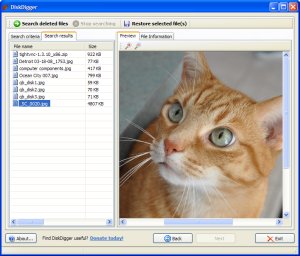
DiskDigger can recover files from any type of media that your computer can read. This includes USB flash drives, memory cards (SD, CompactFlash, Memory Stick, etc), and of course your hard drive. The types of files that it recovers include photos, videos, music, documents, and many other formats.
DiskDigger can even scan reformatted or badly formatted disks (disks to which Windows can't assign a drive letter), and even disks with bad sectors. It bypasses the Windows file system drivers and scans your disk directly. It has its own built-in support for the following file systems: FAT12 (floppy disks), FAT16 (older memory cards), FAT32 (newer memory cards and hard disks), NTFS (newer hard disks), and exFAT (Microsoft's new successor to FAT32).
DiskDigger is also very compact and portable. The entire program is a single executable file that you can run from anywhere. There's nothing to "install," and the program doesn't leave any trace of having been run.
You may find DiskDigger useful if...
- you deleted one or more photos from a memory card by accident, and want them restored.
- you deleted one or more photos from a memory card on purpose, but now want them restored.
- you deleted some documents from your USB flash drive, and want to recover them.
- you came across an old hard drive of yours (or someone else's) that's been reformatted, and would like to see what its previous contents were.
- you've "securely wiped" your media, and want to make sure that your media has actually been wiped correctly.
- you're just curious about what old deleted files are still present on your memory cards or hard drives.
DiskDigger is also a work in progress. This means that new features will be added very frequently, including support for more file formats, more configuration options, etc., so check back for updates.
How does it work?
DiskDigger has two modes of operation which you can select when scanning your media for deleted files:
- Scan the file system for deleted files (dig deep). This scans the file system that is present on your media, searching for deleted file entries. Supported file systems are FAT12, FAT16, FAT32, exFAT, and NTFS. The advantages of this are:
- Very fast
- Recovers all file types
- Recovers file names
And the disadvantages are:
- Doesn't support all possible file systems (see above for supported file systems)
- Doesn't scan entire disk (only scans what the file system is aware of) - Scan the disk surface for traces of lost files (dig deeper). This thoroughly scans every sector of your media, searching for traces of known file types. The advantages of this are:
- Scans entire disk
- Goes underneath the file system, therefore independent of file system
And the disadvantages are:
- Slower (sometimes much slower) than the first method
- Doesn't recover file names or fragmented files
- Only supports certain file types
- Finds 'existing' files as well as deleted files
What isn't DiskDigger?
It's not magic. It can't recover any arbitrary file from any amount of time in the past. When trying to recover lost files, you should be realistic. In a real-world situation, you'll have a good chance of recovering your files only if they were deleted very recently. The more you keep using your disk to work with new files, the slimmer your chance of recovering deleted files. Of course it's always worth a try.
It is not a "repair" utility. It cannot repair a broken memory card or disk. DiskDigger is a strictly "read-only" tool, and never changes the contents of the media you scan. It will, of course, scan unformatted (or badly formatted) media, but it won't attempt to fix the formatting of the media.
Features:
- DiskDigger scans for many different types of files, including photos, videos, music files, and documents, and displays what it finds as it scans in real time.
- You can preview most of the files found by DiskDigger without having to save them to a different location first. More than that, you can preview files while DiskDigger continues scanning!
- DiskDigger scans any type of media that is readable by your computer, including USB flash drives, memory cards (SD, CompactFlash, Memory Stick, etc), and your hard drive(s).
- It can undelete files from all types of FAT partitions (including the new exFAT file system), as well as NTFS.
- It can go underneath the file system to scan for traces and remnants of lost files.
- DiskDigger does everything in memory, meaning that it never writes any temporary files to your disk or other media (unless you choose to save files that it recovers).
- Since DiskDigger is a completely self-contained program, it leaves no trace on the computer where it is run. It does not save any settings to the registry. There is nothing to "install," and the entire program is a single executable file.
- For advanced users, DiskDigger allows scanning disk image files.
How to Use
I hope that using DiskDigger should be intuitive enough for most people to use without a written guide (if it's not, let me know how I can make it better). However, if necessary, you can check out this excellent step-by-step guide from TechRepublic.
Keeping Up
Suggestions? Comments? Questions? Send them here!
Become a fan of DiskDigger on Facebook, and drop a line!
Revision History
Version 0.8.3 (download this version)
- Added support for .WPD (WordPerfect) file format.
Version 0.8.2 (download this version)
- Improved error handling and saving of large files.
Version 0.8.1 (download this version)
- Improved detection of disk drives. Added logical disk drives for scanning.
- Added ability to select a disk image file for scanning.
Version 0.8.0 (download this version)
- Added functionality to actually undelete files from FAT and NTFS file systems.
- Updated manifest file to automatically ask for admin privileges.
Version 0.6.3 (download this version)
- Added support for Rich Text Format (RTF).
Version 0.6.2 (download this version)
- Added progress indicator when saving multiple files.
Version 0.6.1 (download this version)
- Added support for saving multiple files at a time.
- Added "select all" right-click menu option.
- Fewer false positives for MOV files.
Version 0.6.0 (download this version)
- Initial release to the Web.


February 22nd, 2010 at 10:07 am
[...] DiskDigger has a clean, easy to understand interface. You don’t need to install this program onto your hard disk, which means you could run this from a USB stick. [...]
February 23rd, 2010 at 2:02 pm
[...] TestDisk - CGSecurity Pandora File Recovery - Find and recover deleted files of any type - free. DmitryBrant.com DiskDigger Recuva - Undelete, Unerase, File and Disk Recovery - Free [...]
February 24th, 2010 at 6:03 am
[...] terdahulu diatas anda juga bisa menggunakan software : Recuva (Windows), Glarry Undelete (Windows), DiskDigger (Windows), Pandora File Recovery (Windows), EASEUS Deleted File Recovery (Windows), dan lain lain (cari [...]
February 24th, 2010 at 11:21 pm
Hola quisiera saber si hay una version en español de este excelente programa.
Muchas Gracias.
February 24th, 2010 at 11:37 pm
Diskdigger works great. Only feature it is missing that I needed was the ability to search for .txt files from a formatted harddrive.
February 25th, 2010 at 10:10 am
[...] DiskDigger [...]
February 25th, 2010 at 5:45 pm
I was excited and disappointed. DiskDigger located my AVI files that were accidentally deleted less than one hour ago. However, after restoring all of them, I am unable to view them. I noticed AVI file is not in the list of accepted file formats for recovery.
I really really need something that works on AVI files, as that is what is imperative for me to recover from my camera's SD card.
Can anyone help me???
February 26th, 2010 at 4:59 pm
[...] Download DiskDigger from here. Tags: pc help, recovery, windows 7, windows vista, windows xp February 26th, 2010 | No Comments | Posted in Microsoft [...]
February 28th, 2010 at 5:26 pm
[...] One of the best file recovery software is DiskDigger. [...]
March 7th, 2010 at 6:16 pm
[...] te dejo una aplicación portable para recuperar archivos borrados incluso en Windows 7.Se trata de DiskDigger aplicación que puede recuperar archivos de cualquier tipo de dispositivos de almacenamiento como [...]
March 9th, 2010 at 1:20 pm
Gracias por la plaicacion, aunque este en ingles!!!
Me servira de mucho en unos archivos que tenia guardados en mi USB.
March 11th, 2010 at 4:01 am
[...] DiskDigger es un programa GRATUITO y lo puedes descargar directamente de la Web del autor: Dmitry Brant. CompartirEtiquetas: ficheros, [...]
March 11th, 2010 at 6:36 am
[...] DiskDigger, pour récupérer les fichiers effacés [...]
March 11th, 2010 at 11:55 am
[...] the person but I'm going to drop it at this point. The End Here's the program if you need it: DmitryBrant.com DiskDigger Attached Images __________________ HEATWARE=38 HD FOLDING Asus P6T I7920 [...]
March 14th, 2010 at 6:54 pm
It´s works with h264 (mp4)files? thanks
March 19th, 2010 at 4:02 pm
[...] Download: DiskDigger 0.8.3 (661KB) Share [...]
March 20th, 2010 at 5:04 am
this program really works. i have tried other freewares but they did not recover my files.
my sd card got corrupted and i thought i have saved it in my hard drive so i formatted it. i was shocked to find out that i did not saved the photos. but thanks to diskdigger, i am able to recover important pictures. it works seamlessly with my windows 7 64-bit. thanks a lot.
March 21st, 2010 at 6:56 am
[...] digger to the rescue By venkatarv Disk Digger is one of the newer generation tools to retrieve accidentally deleted files. Deleted files are [...]
March 22nd, 2010 at 10:51 am
[...] Önceden adını verdiğimiz yazılımlara ek olarak; sadece belge kurtarmaya odaklı DiskDigger (http://dmitrybrant.com/diskdigger) isimli bir yazılım [...]
March 23rd, 2010 at 8:13 am
[...] Descargar [...]
March 23rd, 2010 at 12:54 pm
[...] should be intuitive enough for most people to use without a written guide (if it’s not, let me know how I can make it better). However, if necessary, you can check out this excellent step-by-step [...]
March 24th, 2010 at 3:33 pm
gracias que Dios te bendiga un buen trabajo es este estupendo programa. que estes bien
March 26th, 2010 at 4:21 pm
Very good program...would highly recommend it...needs support for MS outlook databases though.
April 1st, 2010 at 3:53 pm
[...] hard disk or USB drive gets deleted. Fret not, since these deleted files are still recoverable. DiskDigger is a free portable app that lets you recover all lost files of any type(image, document, video, [...]
April 6th, 2010 at 4:44 am
[...] (http://dmitrybrant.com/diskdigger) [...]
April 9th, 2010 at 6:17 pm
diskdigger is pure genius. i just recovered hundreds of wedding photos which were accidently deleted of my wifes camera (sd card). You've totally made her day. thank you.
April 11th, 2010 at 5:22 am
[...] Potete scaricare DiskDigger clicca qui. [...]
April 12th, 2010 at 10:51 pm
This is a pretty cool program. I'm hoping it will recover some old version of a corrupt doc for me. Which gets me to my one small feature request: search only for specific types of Office documents. I've got thousands of deleted files to sort through. Oh well, as long as it shows up I'll be happy.
April 13th, 2010 at 4:31 am
[...] (http://dmitrybrant.com/diskdigger) [...]
April 15th, 2010 at 8:39 am
[...] use DiskDigger works everytime and is free Reply With Quote [...]
April 19th, 2010 at 12:08 am
Excellent! Worked perfectly when freshly I deleted from a CF card. Missing some pics on my desktop file, I realized the deleted CF files were not sent to the recycle bin. Saved my bacon...Thanks!
April 20th, 2010 at 2:01 pm
[...] Download DiskDigger from dmitrybrant.com [...]
April 20th, 2010 at 3:46 pm
[...] Download DiskDigger from dmitrybrant.com [...]
April 20th, 2010 at 5:14 pm
[...] DiskDigger from dmitrybrant.com [...]
April 21st, 2010 at 1:02 pm
[...] Descarga DiskDigger from dmitrybrant.com [...]
April 23rd, 2010 at 9:13 am
i cant view the video(rm/flv) after recover it =( what can i do??
April 23rd, 2010 at 9:13 am
it came out with "unable to detemine the size of this file" X.X
April 24th, 2010 at 3:50 pm
it came out with “unable to detemine the size of this file" what is needed save this
music file. what amount do i enter.
Thank you
response asp.
April 24th, 2010 at 8:37 pm
disk digger located the mov. files of all different MB-amounts of sizes that were accidentally formatted from a SD card. But when I tried to open them (after saving them) in quicktime it just came out as a blank black screen on my PC and a blank blue screen on my MAC. Any suggestions?
April 25th, 2010 at 8:39 am
[...] Se vui scaricare un Programma per recuperare Dati Hard Disk, scarica DiskDigger su dmitrybrant.com [...]
April 27th, 2010 at 6:21 pm
[...] DiskDigger es una herramienta que nos permite recuperar archivos borrados de cualquier tipo tanto del sistema como de dispositivos USB. [...]
April 27th, 2010 at 6:28 pm
[...] DiskDigger es una herramienta que nos permite recuperar archivos borrados de cualquier tipo tanto del sistema como de dispositivos USB. [...]
April 27th, 2010 at 11:23 pm
[...] únicamente disponible en idioma inglés, algo que no resultará un problema seguramente.Descargar: Disk DiggerFuente: Punto Geek google_ad_client = "pub-5441882084840746"; /* 300x250, creado 11/03/10 */ [...]
April 28th, 2010 at 4:09 pm
[...] Download DiskDigger from dmitrybrant.com [...]
April 29th, 2010 at 3:23 am
[...] Enlace: DiskDigger [...]
April 29th, 2010 at 8:00 am
[...] Fuente: DiskDigger [...]
May 2nd, 2010 at 1:16 pm
[...] archivos tanto en el disco duro de nuestro PC como en una memoria extraíble USB.Descarga: DiskDiggerFuente | PuntoGeek Tags: diskdigger, recuperar archivos, recuperar archivos de la [...]
May 2nd, 2010 at 3:44 pm
I Accidentally formatted a full compact flash card from my Nikon after first inserting into my computer and viewing them, forgetting that I had not copied them into another folder first. Diskdigger recovered every photo on the card, including ones that had not been overwritten since over a thousand photos had been taken over the last eight months! The process was seamless and relatively quick. I would recommend this software to anybody.
May 3rd, 2010 at 2:14 am
[...] Recupero file cancellati DmitryBrant.com DiskDigger [...]
May 3rd, 2010 at 3:02 am
[...] DiskDigger è un’applicazione gratuita per Windows che si occupa di ripristinare i file eliminati. Il software è semplice da utilizzare, non richiede neanche l’installazione (è portable) ed è in grado di recuperare immagini, video, audio e documenti da hard disk, chiavi USB e memory card (SD, CompactFlash, Memory Stick, ecc. ecc.). [...]